Read and reply from a shared Outlook inbox
Catch up on shared email and prepare a reply for review.
 Hilma BengtssonUpdated
Check access and ownership before you reply
Catch up on a shared mailbox, find the right context, and prepare a reply for review.
A shared Outlook mailbox can help a team manage addresses such as support@ or sales@. The mailbox is separate from each teammate’s personal inbox, and access depends on the permissions set by your Microsoft 365 administrator.
Scape connects to Outlook through delegated Microsoft permissions and can sync shared mailboxes that the connected account is already authorized to access. Make sure the mailbox is available in Scape before using it in this workflow. Before relying on Scape with a shared mailbox, check that its messages appear in your connected inbox.
Find the message that needs an answer
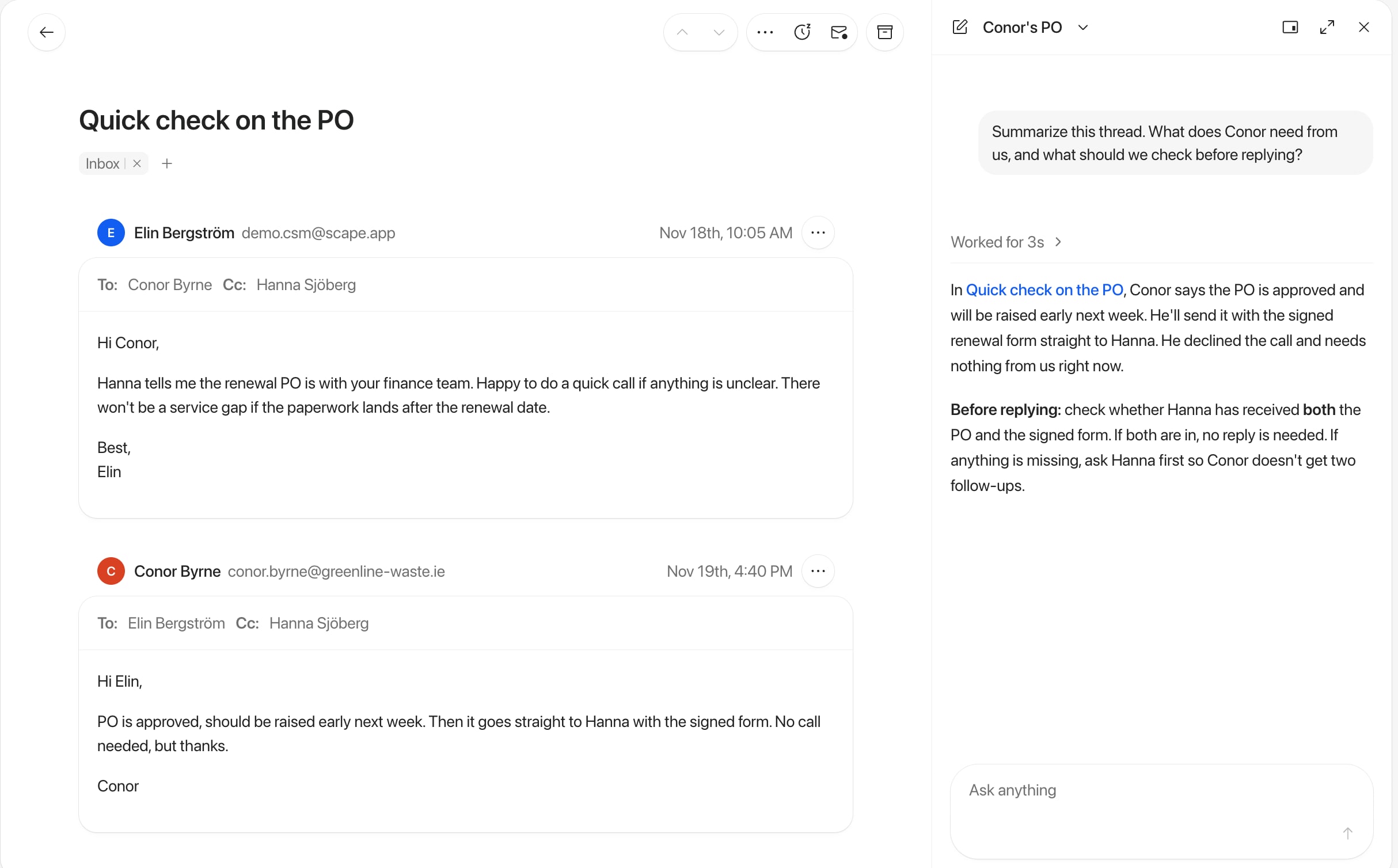
Ask Scape to look for unread messages, a customer name, or a topic in the shared mailbox. Once you find the message, open the thread and ask what still needs a reply. This example uses a purchase-order conversation in a connected demo inbox.
Ask Scape
Summarize this thread. What does Conor need from us, and what should we check before replying?
Check the original message and any earlier replies before responding. A shared inbox may have multiple teammates handling the same request, so check whether someone has already taken ownership.
Prepare a reply with the thread context
Ask Scape to draft a response based on the customer’s message and the context you provide. Add any approved answer, product detail, or next step that should be included.
Ask Scape
Draft a reply explaining the troubleshooting step we confirmed. Keep it clear and don’t promise a resolution date.
Review the draft for accuracy and tone. Before sending from a shared mailbox, verify the From address and test that the message is sent using the expected shared address. Microsoft permissions for sending are separate from mailbox access.
Keep ownership clear across the team
A shared mailbox works best when the team has a simple way to show who is handling each message. Agree on how to mark a conversation as owned, what to do when another teammate is already replying, and when to escalate a request.
Scape can help summarize the thread or find related account context, but team members should follow the mailbox’s ownership process before responding.
Check the reply against the team’s latest answer
Before answering a customer, read the latest outgoing message as well as the newest request. A teammate may already have offered a troubleshooting step or promised an update. Ask Scape to identify that history so your reply moves the conversation forward instead of repeating it.
Ask Scape
Summarize the latest request in this shared thread, the last answer from the team, and anything the customer still needs. Draft a reply that does not repeat steps they have already tried.
Check that the mailbox is available in Scape and verify the From address and Microsoft send permissions before relying on the shared sender. For setup, use the Outlook shared-mailbox guide. This does not replace your team’s ownership process: confirm who will send the answer so the customer does not receive two replies.
Related articles
How to add a shared mailbox in Outlook
Add a shared mailbox and check read and send permissions.
Read moreTeam email management for customer-facing teams
Keep customer context close while your team shares the work of replying.
Read moreOutlook integration
Connect Outlook to find context and prepare replies in Scape.
Read more
Frequent questions
Answers to common questions. For anything else, the Scape team reads every email.
Contact ScapeWhat is a shared Outlook mailbox?
It is a mailbox that multiple people can access using their own accounts, when an administrator grants them the appropriate permissions.
Can Scape access an Outlook shared mailbox?
Scape uses delegated Microsoft permissions and can sync shared mailboxes the connected account is authorized to access. Check that the mailbox appears in Scape before relying on it.
Can I send from the shared address?
Microsoft requires the connected account to have the appropriate send permission. Check the From address and test the Scape workflow before relying on a reply from the shared address.
Is a shared mailbox the same as a shared conversation in Scape?
No. A shared mailbox is managed in Outlook. Sharing a conversation in Scape gives teammates access to that conversation only and does not grant access to the rest of the mailbox.