Meeting preparation checklist for client calls
Get ready for client calls with a practical preparation checklist.
 Hilma BengtssonUpdated
1. Check the purpose of the call
A client call goes more smoothly when you know what the client needs, what your team promised, and what you still need to ask. This checklist helps you get ready without spending half the morning searching through email.
Read the invitation and confirm why the meeting is happening. Is it a status update, a decision, a renewal conversation, or a first introduction? If the goal is unclear, ask the organizer before the call.
2. Review recent emails and notes
Look for the latest customer message, any questions they’re waiting on, and what your team has already promised. Check notes from the last conversation so you don’t ask the client to repeat information they have already shared.
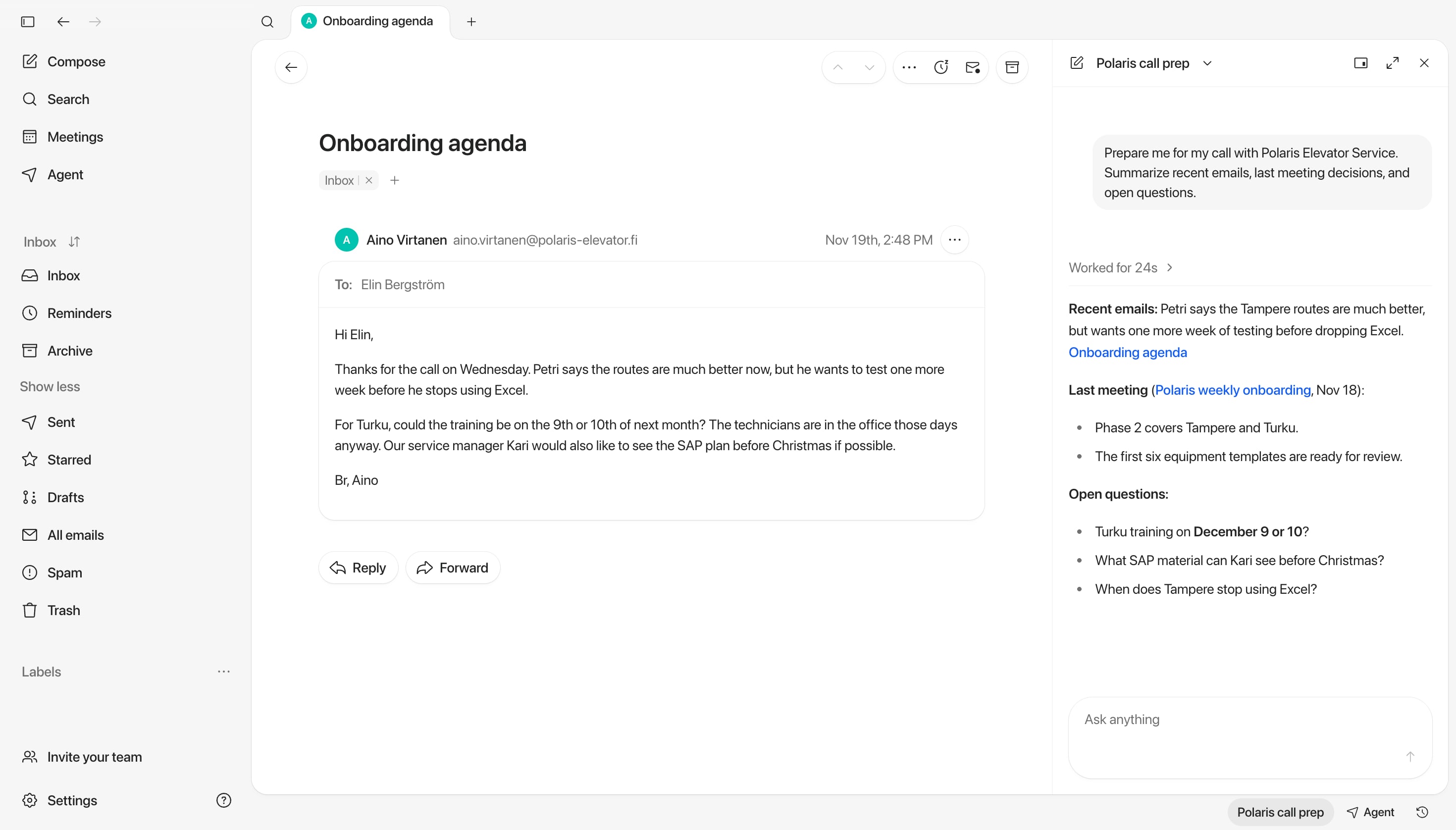
Ask Scape
Prepare me for my call with Polaris Elevator Service. Summarize recent emails, last meeting decisions, and open questions.
Review the source messages before relying on a date, price, or commitment.
3. Confirm the people attending
Check who is joining and what each person may need from the conversation. If someone new is attending, make sure you have enough background to introduce the topic clearly.
4. Decide what you need from the call
Write down one or two outcomes you want. You might need a decision, confirmation of a timeline, or an answer to a specific question. A short list helps you keep the conversation focused.
5. Prepare your questions
Bring questions that help you understand the client’s priorities and what is blocking progress. Put the most important question first in case time runs short.
6. Gather the materials you may need
Open the proposal, project plan, support issue, or dashboard before the call. If the information lives in a connected app, check that you can access it before the meeting starts.
If the customer’s question depends on a project update or CRM record, include that source in your request to Scape. A deal marked “negotiation” and an email saying “approved” may reflect different moments; compare them before treating either as the final decision.
Ask Scape
Compare Polaris Elevator Service’s latest email with the connected CRM record. List any differences in scope, dates, or next steps that I should confirm on the call.
Connect Attio or HubSpot if that is where the account history lives. Only ask for the sources that matter to this meeting.
7. Leave room for notes and next steps
Plan to capture decisions, owners, deadlines, and open questions. Don’t try to write down every sentence. Focus on what the team needs to remember or do after the call.
Scape can record supported meetings locally without a bot joining the call, then create a transcript and summary. Learn more in AI executive assistant for email and meetings.
A quick checklist to copy
- The goal of the call is clear.
- I’ve read the latest customer email and meeting notes.
- I know what we promised and what remains open.
- I’ve prepared the questions I need answered.
- The documents or project details I may need are ready.
- I know what next steps we need to confirm.
Related articles
Prepare for a meeting with AI
Find the context you need before your next customer call.
Read moreFollow-up email after a meeting: examples you can copy
A few short paragraphs or bullet points are usually enough.
Read moreTurn meeting notes into action items
Turn meeting notes into clear owners, next steps, and dates.
Read more
Frequent questions
Answers to common questions. For anything else, the Scape team reads every email.
Contact ScapeHow do you prepare for a client meeting?
Review recent messages and notes, confirm the meeting goal, prepare a few questions, and have the relevant documents ready.
What should I ask a client in a meeting?
Ask about their priorities, what has changed, what is blocking progress, and what outcome they need next.
How long should I spend preparing for a client call?
It depends on the relationship and the decisions involved. A quick review of recent messages and the last meeting is often enough for a routine check-in.
Can AI prepare me for a client meeting?
Yes. Scape can search connected email, calendar, meeting notes, and apps to create a brief for you to review.