Prepare for a meeting with AI
Find the context you need before your next customer call.
 Hilma BengtssonUpdated
Start the call with the customer’s recent context
A little context before a call can make it easier to focus on the conversation instead of searching through old messages.
A meeting invite tells you when to show up. It doesn’t always tell you what happened last time, what the customer is waiting for, or which decision still needs to be made. Scape can bring together relevant context from your connected email, calendar, meeting notes, files, and apps so you can start the call with a clearer picture.
You can ask Scape to find recent emails, recap earlier conversations, surface open questions, or look for a decision from a past meeting. If you have connected tools such as Slack, Linear, GitHub, or Notion, Scape can also search the information you have permission to access there.
Find the conversation behind the meeting
Before a customer call, ask Scape to look for the latest messages with that person or company. It can summarize what they asked for, what you promised, and what may still need an answer.
Ask Scape
Find the latest emails from Polaris Elevator Service and summarize what they’re waiting for before today’s call.
A useful prompt includes a name, project, topic, or approximate date. If Scape finds a few possible conversations, check the source message before relying on a detail.
Bring in notes from other apps
Meeting preparation often means switching between email, chat, project tools, and documents. Connect the services you use, then ask Scape to search for the specific context you need. For setup steps, see Slack integration, Linear integration, GitHub integration, and Notion integration.
Ask Scape
Check Slack and my email for the latest launch update, then list anything I should ask on the call.
Scape uses the connected account’s available permissions. If you ask it to create or change something in a connected app, it presents the proposed action for your approval.
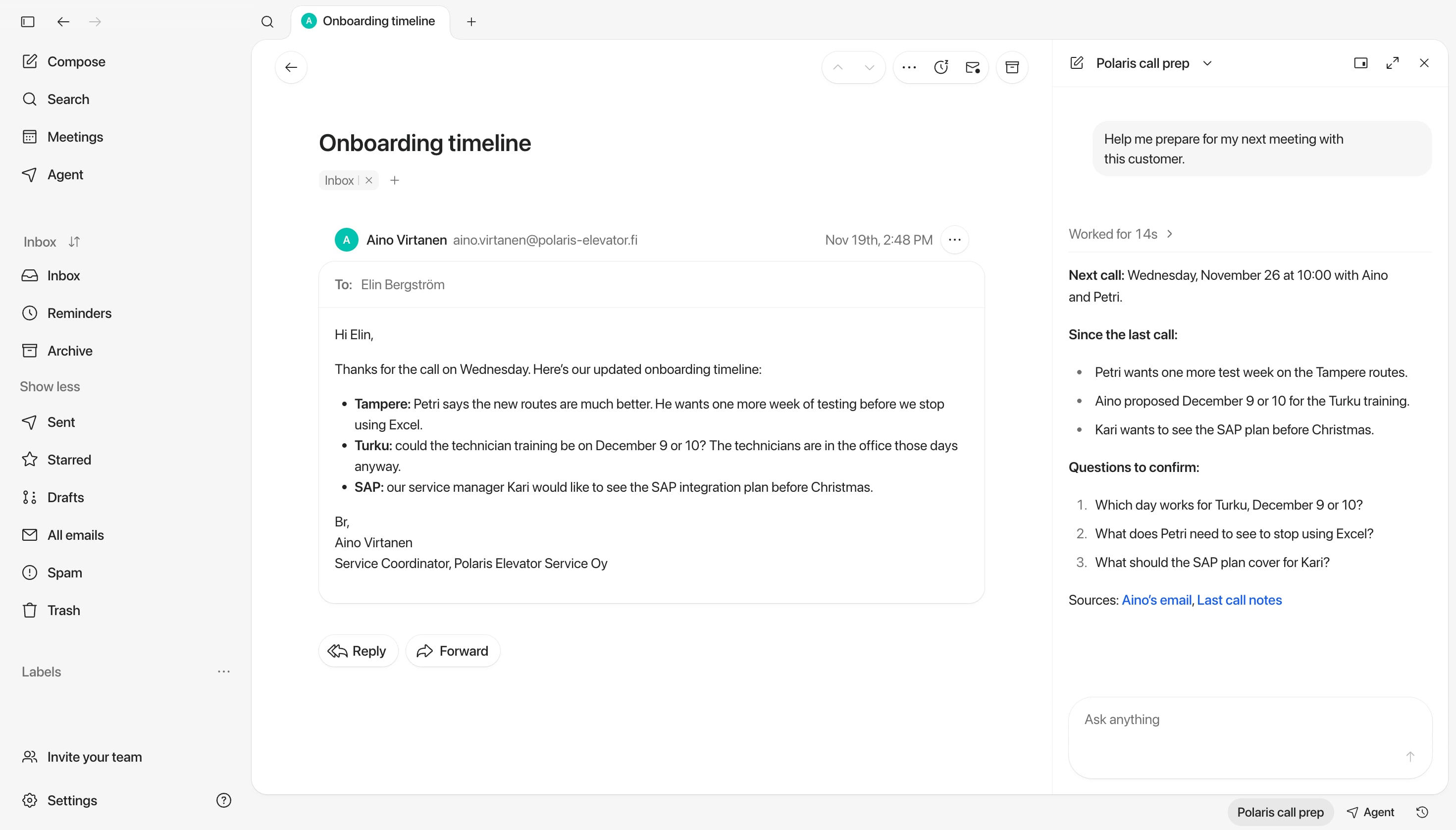
Build a short call brief
Ask for a compact brief with the goal of the meeting, recent context, open questions, and any commitments to confirm. You can also ask Scape to separate confirmed facts from questions that still need an answer.
Ask Scape
Help me prepare for my next meeting with this customer.
Use the brief as a starting point, not a substitute for checking important details in the original email or document.
Use the calendar and past meetings
When your calendar is connected, Scape can use event details to understand which meeting you mean and help you find related context. Previous Scape meeting transcripts and summaries can also help you pick up where the conversation left off.
After the call, Scape can help turn the notes into action items or prepare a follow-up draft. See Draft follow-up emails from meeting notes.
Related articles
Meeting preparation checklist for client calls
Get ready for client calls with a practical preparation checklist.
Read moreTurn meeting notes into action items
Turn meeting notes into clear owners, next steps, and dates.
Read moreGoogle Calendar integration
Use Google Calendar context to prepare for your next meeting.
Read more
Frequent questions
Answers to common questions. For anything else, the Scape team reads every email.
Contact ScapeWhat should I include in an AI meeting-prep prompt?
Include the person or company, the meeting topic, and what you want to know, such as recent decisions or open questions.
Can Scape prepare for a meeting using email and Slack?
Yes, if you connect the relevant accounts and grant access. Scape can look across connected sources in response to your request.
Can Scape create a meeting agenda?
Scape can help draft an agenda from the context you provide. Review it to make sure it reflects the meeting’s purpose and the topics attendees expect to cover.
Does a bot join the meeting?
No. Scape’s supported meeting recorder captures locally without adding a bot to the call.