Turn meeting notes into action items
Turn meeting notes into clear owners, next steps, and dates.
 Hilma BengtssonUpdated
Give every next step an owner and a clear outcome
Turn a conversation into clear owners, next steps, and dates you can check later.
A meeting can end with a clear plan and still leave everyone wondering who agreed to do what. Turning notes into action items gives the team a simple record of the next steps, owners, and due dates.
Scape can use a meeting transcript or notes to identify decisions, tasks, open questions, and dates. You can ask for a checklist or a short recap, then review it against the conversation before sharing it.
Start with a record of what was agreed
If you want action items from a meeting, first make sure you have a reliable record. Scape can record supported meetings locally without a bot joining the call, then produce a transcript and summary. You can stay with the conversation and use the transcript to check who agreed to do what afterward.
Once the meeting record is available, ask Scape to separate decisions, actions, and open questions. A task mentioned as a possibility should not appear as an agreed assignment.
See recording meetings in Scape for the recording workflow, or preparing for a meeting to gather the context before the call.
Pull out the next steps
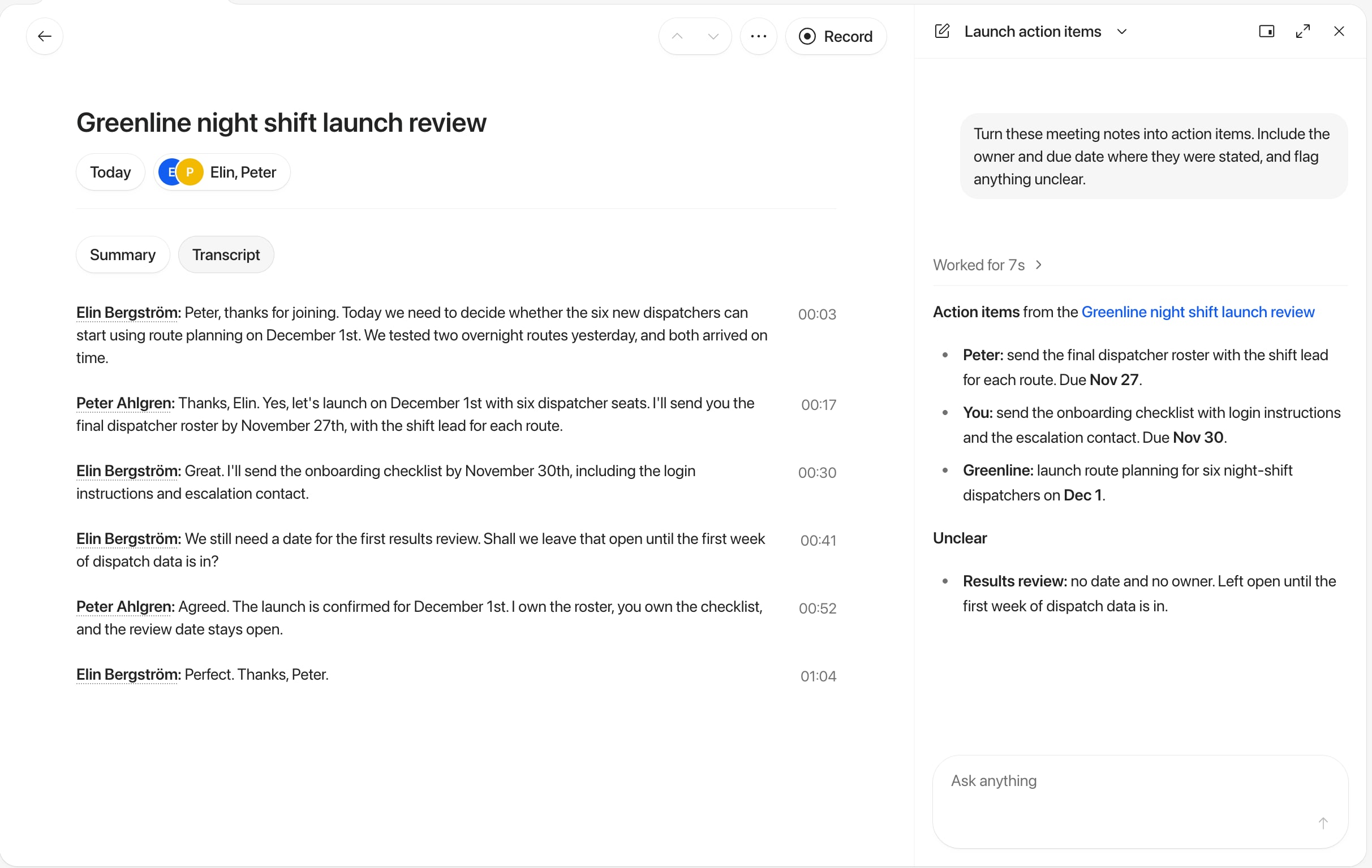
Ask Scape to list the tasks mentioned in the meeting and include an owner or deadline only when one was actually agreed.
Ask Scape
Turn these meeting notes into action items. Include the owner and due date where they were stated, and flag anything unclear.
That last instruction helps avoid turning a suggestion into a commitment. If the notes don’t say who owns a task, ask Scape to mark the owner as unassigned rather than guess.
Separate decisions from discussion
Long notes can mix decisions, ideas, and questions. Ask Scape to separate what the group decided from topics that still need discussion.
Ask Scape
Summarize the decisions, list open questions, and show the next step for each decision.
Check names, dates, and wording in the transcript or notes before sharing the summary. A small correction can prevent confusion later.
Use action items across meetings
For recurring projects, ask Scape to compare the latest meeting with an earlier transcript or related email. This can help you see which tasks are new, completed, or still waiting for an update.
Ask Scape
Compare today’s notes with the last project meeting. Which action items are still open?
Scape can use connected meeting and email context. For more context, connect the apps where your team tracks work, such as Linear integration or Notion integration.
Related articles
Draft follow-up emails from meeting notes
Start with what was agreed, then check the draft before it goes out.
Read moreMeeting preparation checklist for client calls
Get ready for client calls with a practical preparation checklist.
Read moreHow to use Attio MCP with your email
Use Attio account context while handling customer email.
Read more
Frequent questions
Answers to common questions. For anything else, the Scape team reads every email.
Contact ScapeCan AI turn a meeting transcript into tasks?
Yes. Scape can identify likely tasks, owners, and dates in meeting notes or transcripts. Review the results and correct anything that wasn’t agreed.
Can Scape assign a task to someone?
Scape can include an owner in a summary when the meeting context identifies one. Check the assignment before adding it to a project tool or sending the recap.
Can Scape record a meeting without a bot?
Yes. Scape records supported meetings locally without adding a bot to the call, then can prepare a transcript and summary.
What if no deadline was agreed?
Leave the date out or mark it as undecided. Don’t add a deadline unless the group agreed to one.