Catch up on a customer account after a sales handoff
Get the account history, open questions, and next steps in one useful summary.
 Hilma BengtssonUpdated
Pick up the relationship without asking the customer to start over
A customer handoff can come with a folder of notes, a long email thread, and a few quick messages from the sales team. Before the next call, you need to understand what the customer bought, what they’re trying to achieve, and what was promised.
Scape can help search connected email, meeting notes, calendar context, and supported apps to prepare an account summary. It can help you find the source material too, so you can check the details behind the handoff.
Start with the customer’s recent history
Ask Scape to summarize the recent conversations with the customer. Ask for their goals, key decisions, commitments, and unresolved questions.
Ask Scape
Catch me up on Polaris Elevator Service before my first customer success call. Summarize their goals, what sales promised, and open questions from recent emails and meetings.
If the account name is shared by several customers or contacts, include the company domain, contact name, or project to narrow the search.
Find context across connected apps
Important account details may live in a CRM, Slack, Notion, or Linear. Connect the services that contain your team’s customer context, then ask Scape for specific information. Setup guides include How to use Attio MCP with your email, Connect HubSpot to Scape with MCP, Slack integration, and Notion integration.
Ask Scape
Look for the latest account notes and customer emails. What should I confirm on the onboarding call?
Results depend on what you connect and which permissions your account has. Check the original record before repeating a commercial term or commitment to a customer.
Turn the handoff into a call plan
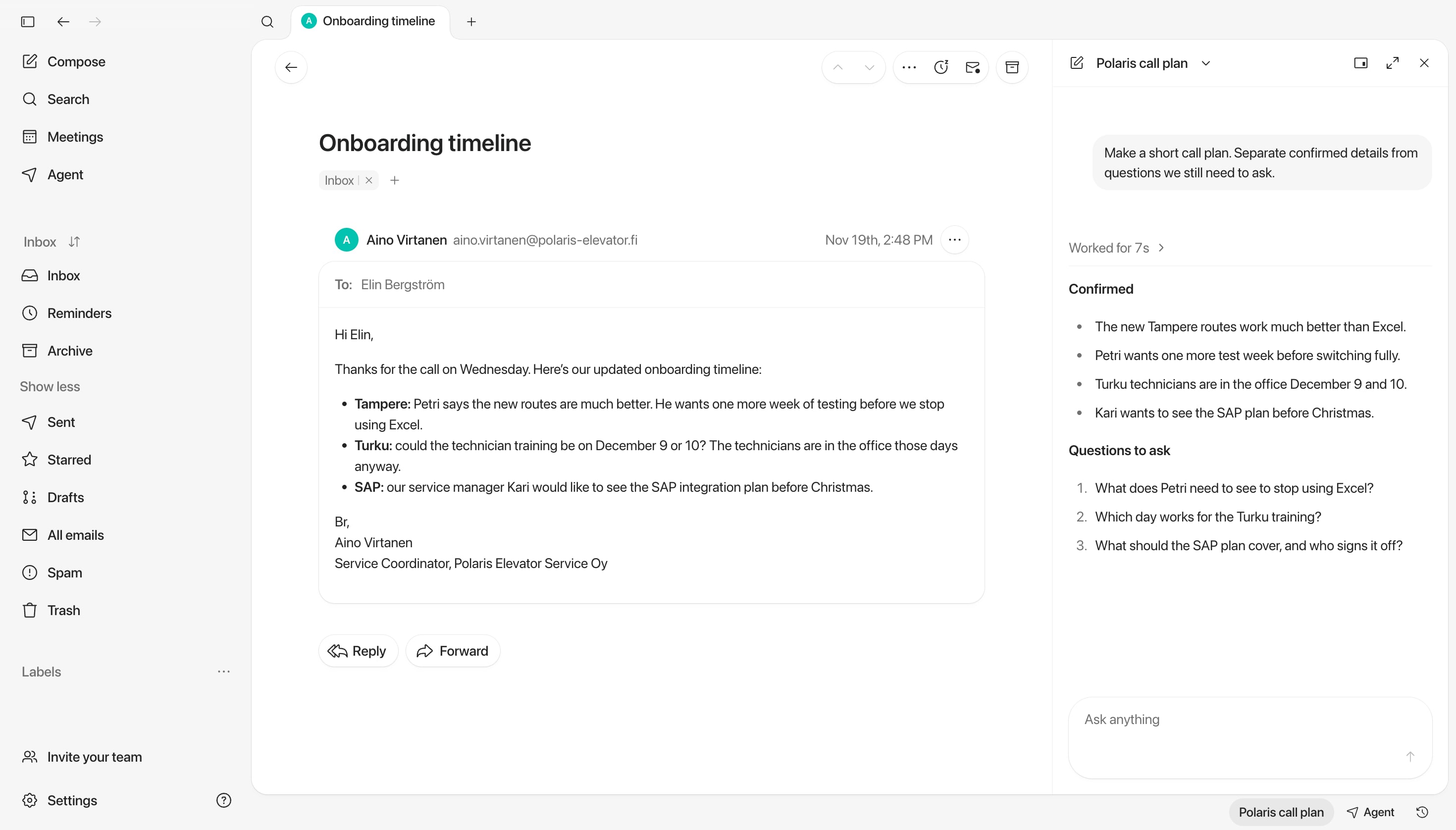
Ask Scape for a short call brief with the customer’s goals, current setup, risks, and questions to clarify. You can also ask for a checklist that separates known facts from details you still need to confirm.
Ask Scape
Make a short call plan. Separate confirmed details from questions we still need to ask.
This can help you begin with the customer’s priorities instead of asking them to repeat information they already shared.
Record what happens next
After the call, ask Scape to summarize the discussion and list the next steps. Include owners and dates only when they were agreed. You can prepare a follow-up email for the customer and a separate internal handoff note.
Related articles
How to use Attio MCP with your email
Use Attio account context while handling customer email.
Read moreConnect HubSpot to Scape with MCP
Connect HubSpot and use customer context alongside your inbox.
Read morePrepare for a meeting with AI
Find the context you need before your next customer call.
Read more
Frequent questions
Answers to common questions. For anything else, the Scape team reads every email.
Contact ScapeWhat should a customer handoff include?
Include the customer’s goals, what was sold or promised, key contacts, current status, open questions, and the next agreed step.
Can Scape summarize email and CRM context together?
Scape can use connected services that you authorize. The available context depends on the integration and your account permissions.
How to use Attio MCP with your email: Connect HubSpot to Scape with MCP
Can Scape help prepare for my first customer call?
Yes. Ask it to find recent account context and create a brief with goals, open questions, and commitments to verify.
Can Scape create follow-up tasks automatically?
Scape can prepare action items from a meeting summary. Review them before adding or sharing them in another app.